php scripts

News Forge-News Website with Admin Panel.

₹4,999 ₹6,499 Save ₹1,500

One-time purchase — yours forever, no recurring fee

View Live Demo

  • Version: 1.0.0
  • Last Updated: 11 Jul 2026
  • Payment: One-time, no subscription
  • Access: Immediate after payment
Instant Access Secure Payment Refund Policy
NewsForge

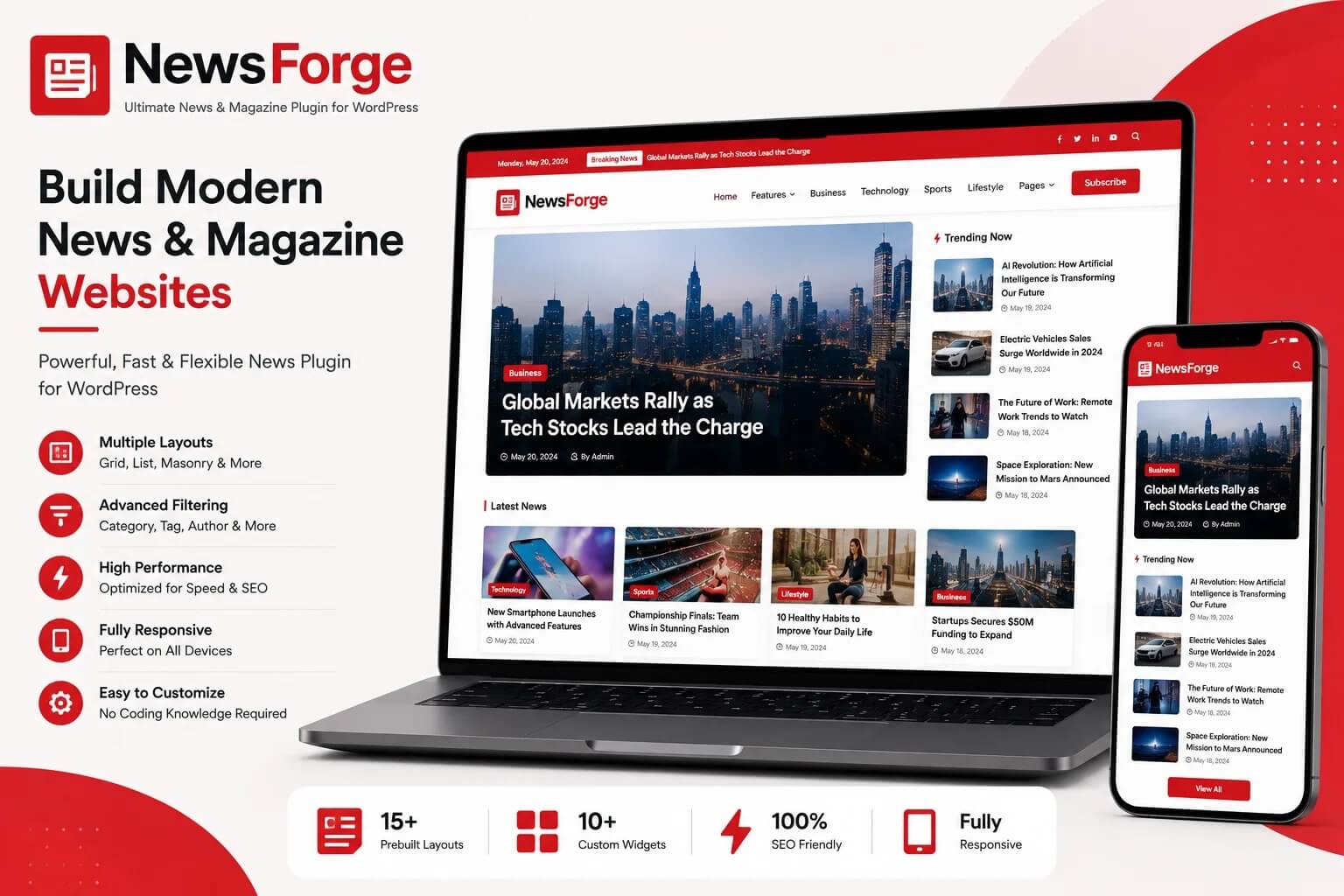
A complete, self-hosted PHP news & magazine CMS with a real editorial workflow, a built-in media library, one-click updates, and a fast, modern reading experience. No frameworks. No Composer. No monthly fees.

100%
Self-Hosted
PHP 8+
Procedural, No Framework
0
Composer Dependencies
4
Built-in Staff Roles
15+
Admin Modules

NewsForge is built for publishers who want a real editorial workflow — not just a blog with categories bolted on. Reporters draft and submit; editors review, reject, or publish; admins manage the whole operation from one clean dashboard.

It installs on ordinary shared hosting in minutes and runs entirely on plain procedural PHP and MySQL — no Laravel, no Symfony, no Composer, no build step. Everything you see in this description is included in the base price; there are no premium add-ons or recurring fees.

FRONTEND

A Fast, Modern Reading Experience

Every page is built mobile-first and fully responsive — the same clean design adapts from a large desktop monitor down to a small phone screen, with no separate "mobile version" to maintain.

Header & Navigation

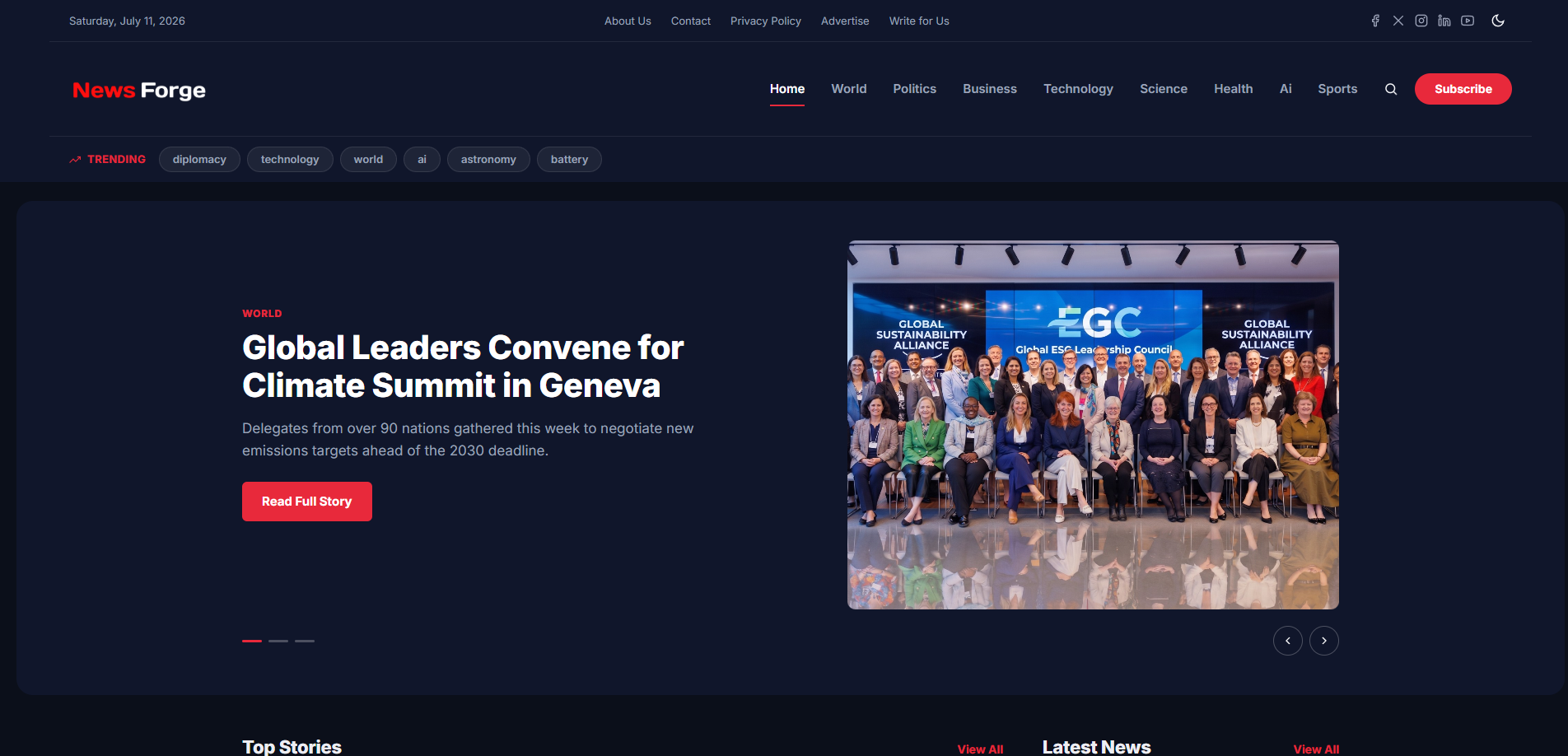
  • Sticky header that stays visible while scrolling, with a subtle glass-blur effect once the page scrolls.
  • Expandable search overlay — click the search icon and a full-width search bar slides down in place, no page navigation needed to start typing.
  • Dark / light mode with automatic system-preference detection, plus a manual toggle always available in the header.
  • Live "Trending Topics" pill strip under the main navigation, pulling from your most-used tags.
  • On mobile, the menu collapses into a smooth slide-down drawer (with animated hamburger-to-close icon) containing navigation, search, subscribe button, social links, and utility pages — keeping the persistent header itself short and out of the way.

Homepage

  • Auto-rotating hero carousel for top/featured stories, with dot navigation and arrow controls, sliding smoothly rather than jump-cutting between slides.
  • "Top Stories" two-column layout: a lead story alongside a stacked list of secondary headlines.
  • "Explore by Category" icon grid — each category can have its own custom SVG icon (upload a file or paste SVG code directly), with a "View All" link through to a full category directory page.
  • "Editor's Picks" and "From Our Writers" sections, plus a numbered "Trending Now" strip based on real view counts.
  • Inline newsletter signup card, and configurable ad slots (header banner, footer banner, sidebar top/bottom, in-article) that simply don't render when left empty.

Article Pages

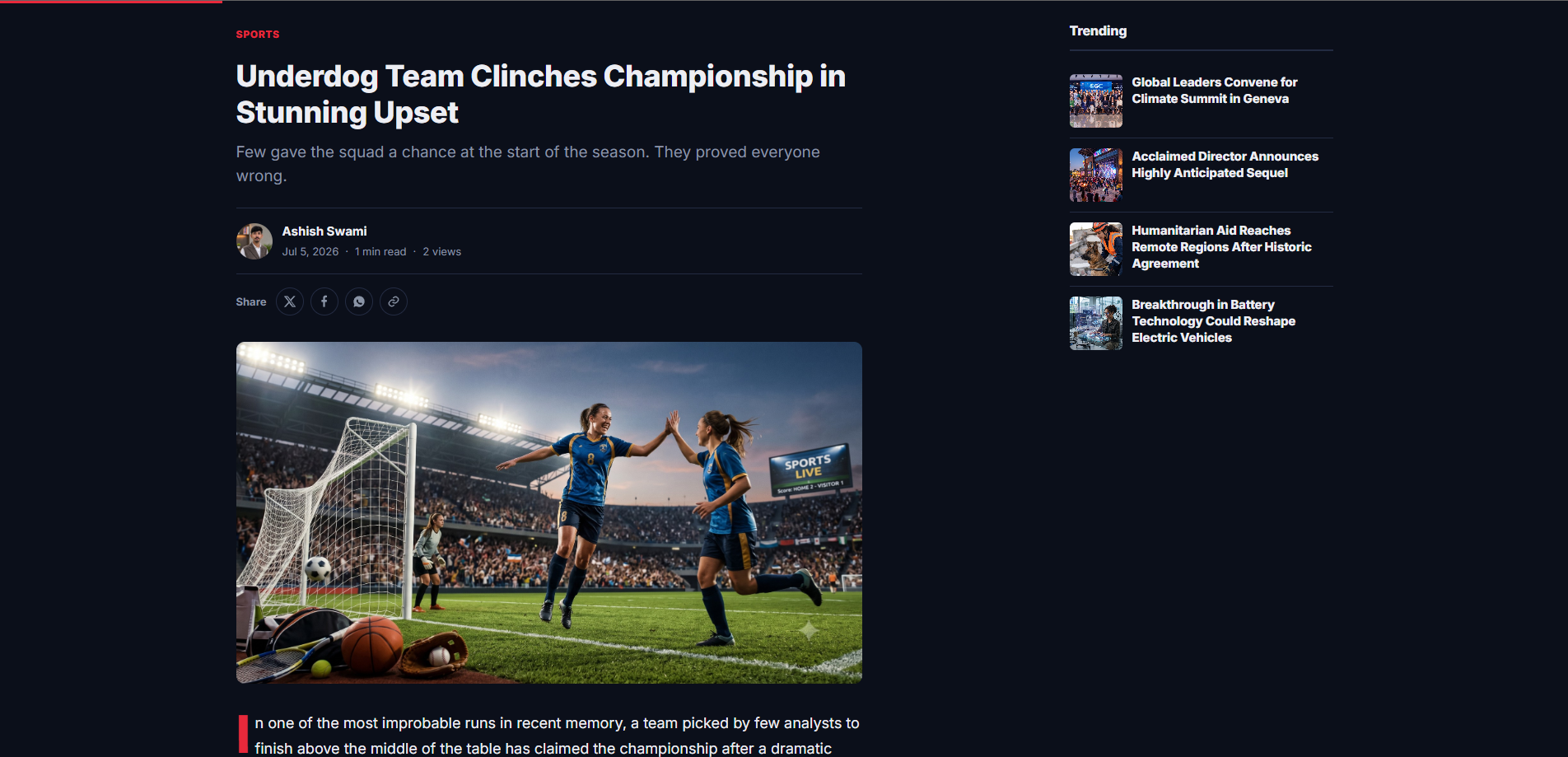
  • Thin reading-progress bar pinned to the top of the viewport, filling in as the reader scrolls.
  • Two-column layout on desktop: article content alongside a sticky sidebar showing "More in [Category]", a trending list, and ad slots — collapses cleanly to a single column on mobile.
  • Author byline with avatar, publish date, estimated reading time, and view count.
  • One-click social sharing (X/Twitter, Facebook, WhatsApp) plus a "Copy Link" button with inline confirmation.
  • Editorial drop-cap styling on the opening paragraph, related-articles grid, tag pills, an author bio box, and a full threaded comment system with reply support.

Category, Tag, Search & Author Pages

  • Dedicated archive pages for every category and tag, with pagination and consistent sidebar widgets.
  • A full "All Categories" directory page (with icons and per-category article counts) reachable from the homepage's "View All" link.
  • Built-in search results page and per-author profile pages listing everything they've published.
ADMIN PANEL

A Complete Newsroom Dashboard

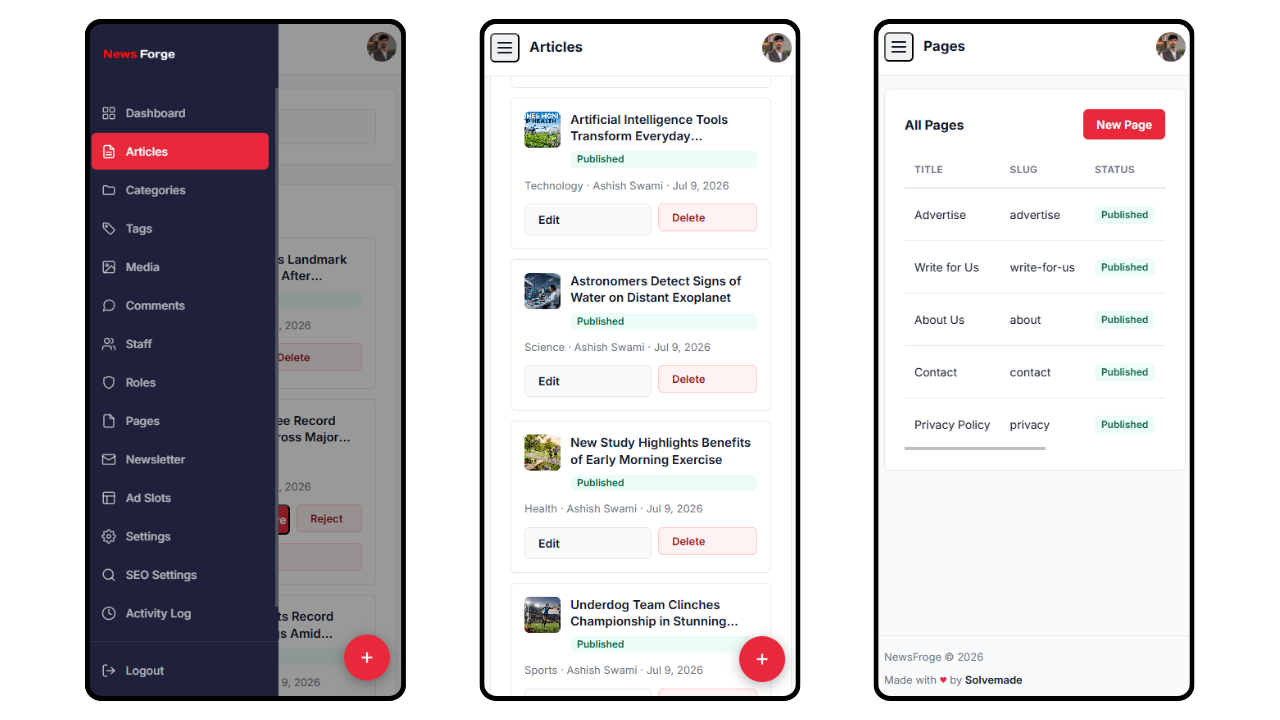
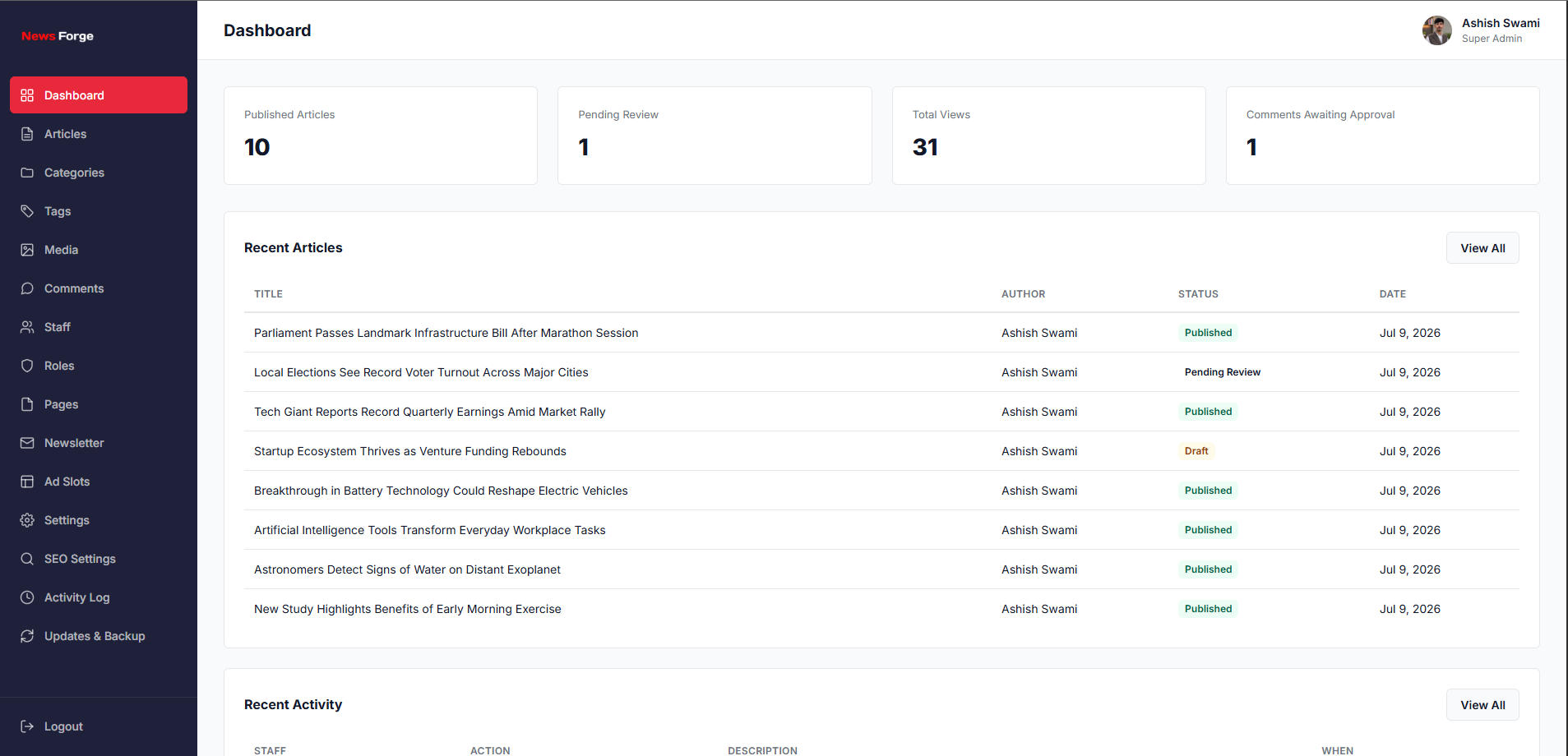
The admin panel is just as responsive as the frontend — reporters and editors can draft, review, and publish comfortably from a phone, not just a desktop. Every list page switches from a table to clean stacked cards on smaller screens.
Editorial Workflow & Roles

  • Super Admin — full control over every module, staff, and settings.
  • Editor — manages all articles, categories, tags, comments, and pages; can approve, reject, or publish.
  • Reporter — creates and edits their own articles, submits for review, and can mark their own stories as breaking news.
  • Moderator — focused purely on comment moderation.
  • Full article lifecycle: Draft → Pending Review → Published / Rejected, plus scheduled publishing for a future date and time.
  • Breaking-news and sponsored-article flags, both reflected instantly on the live site.
  • Custom roles and permissions editor — adjust what each role can and can't do beyond the four defaults.

Media Library

  • One Modern-style picker modal used everywhere an image is needed: article covers, the rich-text editor, staff avatars, and your site logo/favicon.
  • Search your library by filename, multi-select files, and bulk-delete in a couple of clicks.
  • Click any image to open it full-size with a one-click "Copy URL" button — handy for anything outside the CMS itself.
  • Drag-and-drop style upload directly from the picker, so you never have to leave what you're doing to add a new image.

Content Management

  • Rich-text article editor (self-hosted Quill.js) with inline image insertion straight from the media picker.
  • Categories with parent/child hierarchy support and custom SVG icons (upload or paste code — automatically sanitized for safety).
  • Tags, static pages (About, Contact, Privacy Policy, etc. — pre-seeded and fully editable), and a threaded comment moderation queue.
  • Newsletter subscriber list with CSV export, and configurable ad slots for five different placements site-wide.

Updates, Backups & Settings

  • Check for and apply updates right from the admin panel — your license is verified automatically before anything downloads.
  • A full backup (database + site files) runs automatically before any update is applied, and restores with a single click if anything looks wrong.
  • Trigger a manual backup at any time; your database, uploads folder, and configuration file are never touched or overwritten by an update.
  • General settings (site name, tagline, logo, favicon, articles-per-page, footer text), dedicated SEO settings, and a full staff activity log for accountability.
  • Built-in "Forgot Password" flow with a branded HTML email, and rate-limiting on login attempts to slow down brute-force guessing.

SEO-Ready Out of the Box

  • Per-article meta title and description (custom or auto-generated), Open Graph tags, and Twitter Cards.
  • JSON-LD structured data (NewsArticle schema) on every article for rich search results.
  • Auto-generated, always-current XML sitemap and an editable robots.txt — no manual regeneration needed.
  • Clean, human-readable URLs throughout — both frontend and admin.

Security-Conscious by Default

  • CSRF protection on every form, and prepared statements on every database query — no raw SQL concatenation anywhere.
  • Rich-text article content is sanitized server-side, stripping scripts and event handlers before it's ever stored or displayed.
  • Uploaded files are validated by actual file content (not just extension), renamed on upload, and served from a directory where PHP execution is disabled.
  • Rate-limiting on login and password-reset requests to slow down automated abuse.
  • A license-gated installer — verified against your Solvemade account before a single database table is created.
  • Errors are always logged server-side but never displayed to visitors, protecting against accidental information disclosure.

Requirements

  • PHP 8.0 or higher
  • MySQL 5.7+ (or MariaDB equivalent)
  • Apache with mod_rewrite, or LiteSpeed — works out of the box on most shared hosting (Hostinger, Namecheap, GoDaddy, etc.)
  • PHP extensions: PDO, GD, mbstring, zip, curl, dom
  • A valid NewsForge license key (issued automatically after purchase)

No frameworks. No Composer. No monthly fees.

Just a fast, well-built PHP news CMS you own outright.

  • Role-based publishing workflow (Super Admin, Editor, Reporter, Moderator)
  • WordPress-style Media Library with search, bulk actions, and drag-drop upload
  • Category SVG icons — upload a file or paste SVG code directly
  • Sticky, mobile-first responsive header with expandable search overlay
  • Dark / light mode with system preference detection
  • Hero carousel, trending topics strip, and editor's picks on the homepage
  • Reading progress bar, social sharing, and sticky sidebar on article pages
  • One-click in-admin Updates system with automatic pre-update backups
  • Manual backup & restore for database and site files
  • Forgot Password flow with branded HTML email
  • Built-in SEO: meta tags, Open Graph, Twitter Cards, JSON-LD, XML sitemap
  • Newsletter subscriptions and ad slot management
  • Comment system with moderation queue
  • Clean URLs throughout (frontend and admin)
  • No frameworks, no Composer, no external dependencies — pure PHP
  • v1.0.0 2026-07-11

    Initial release

PHP 8.0+, MySQL 5.7+ (or MariaDB), Apache with mod_rewrite (or LiteSpeed) or Nginx Required PHP extensions: PDO, pdo_mysql, GD, mbstring, zip, curl, dom Works on most shared hosting (Hostinger, Namecheap, GoDaddy, etc.) A valid NewsForge license key (provided after purchase) is required during installation
Your purchase includes 6 Month technical support for installation help and bug fixes covering documented features. Contact us through your solvemade.com account — we typically reply within 24–48 hours. Custom development, design changes, and third-party integrations are outside the scope of included support.