Starting a news website can be a great way to build a digital publication, local news portal, niche magazine, or independent media brand. But creating a successful news website involves more than simply publishing articles. You need a reliable content management system, a clear editorial workflow, fast hosting, mobile-friendly design, search engine optimization, and tools for managing your growing team and content.
In this guide, we'll explain how to create a news website in 2026, what you need to get started, how to organize your newsroom, how to optimize your articles for search engines, and how a dedicated news CMS like NewsForge can simplify the entire process.
What Do You Need to Create a News Website?
Before publishing your first article, you'll need a few basic components:
- A domain name for your news brand
- Reliable web hosting
- A news-focused content management system (CMS)
- A mobile-friendly website design
- An editorial workflow for creating and reviewing articles
- SEO tools and structured data
- Social media channels for content distribution
- A strategy for generating traffic and revenue
The right combination of these elements gives you a strong foundation for building a professional online news publication.
Step 1: Choose a Name and Domain for Your News Website
The first step is choosing a memorable name for your publication and registering a suitable domain name.
Try to keep your domain short, easy to remember, and relevant to your publication. Depending on your target audience, you can use a .com, .in, .news, or another relevant domain extension.
For example, a local publication could use a name based on its city, while a niche publication could focus on a specific industry such as technology, business, sports, entertainment, or education.
Before purchasing a domain, make sure the name is easy to spell and doesn't closely resemble an existing publication or trademark.
Step 2: Choose Reliable Web Hosting
Your hosting provider is responsible for running the server where your website and database are stored. News websites can receive sudden traffic spikes when an article becomes popular, so hosting performance is important.
For a new publication, shared hosting can be enough to get started. As your traffic grows, you can move to a more powerful hosting plan or VPS.
If you are using NewsForge, the system is designed to work on common hosting environments. It requires PHP 8.0 or newer, MySQL 5.7+ or MariaDB, and Apache with mod_rewrite, LiteSpeed, or a compatible Nginx setup.
Step 3: Choose a News-Focused CMS
A CMS makes it easier to create, organize, edit, and publish articles without manually building every page.
While a general-purpose CMS can be used to create a news website, a dedicated news CMS can provide features specifically designed around publishing workflows.
NewsForge is a self-hosted PHP and MySQL news and magazine CMS designed for publishers who want to manage their publication from their own hosting environment.
It does not require a framework or Composer, which can make the installation and hosting setup simpler for many users.
Step 4: Set Up Your News Website
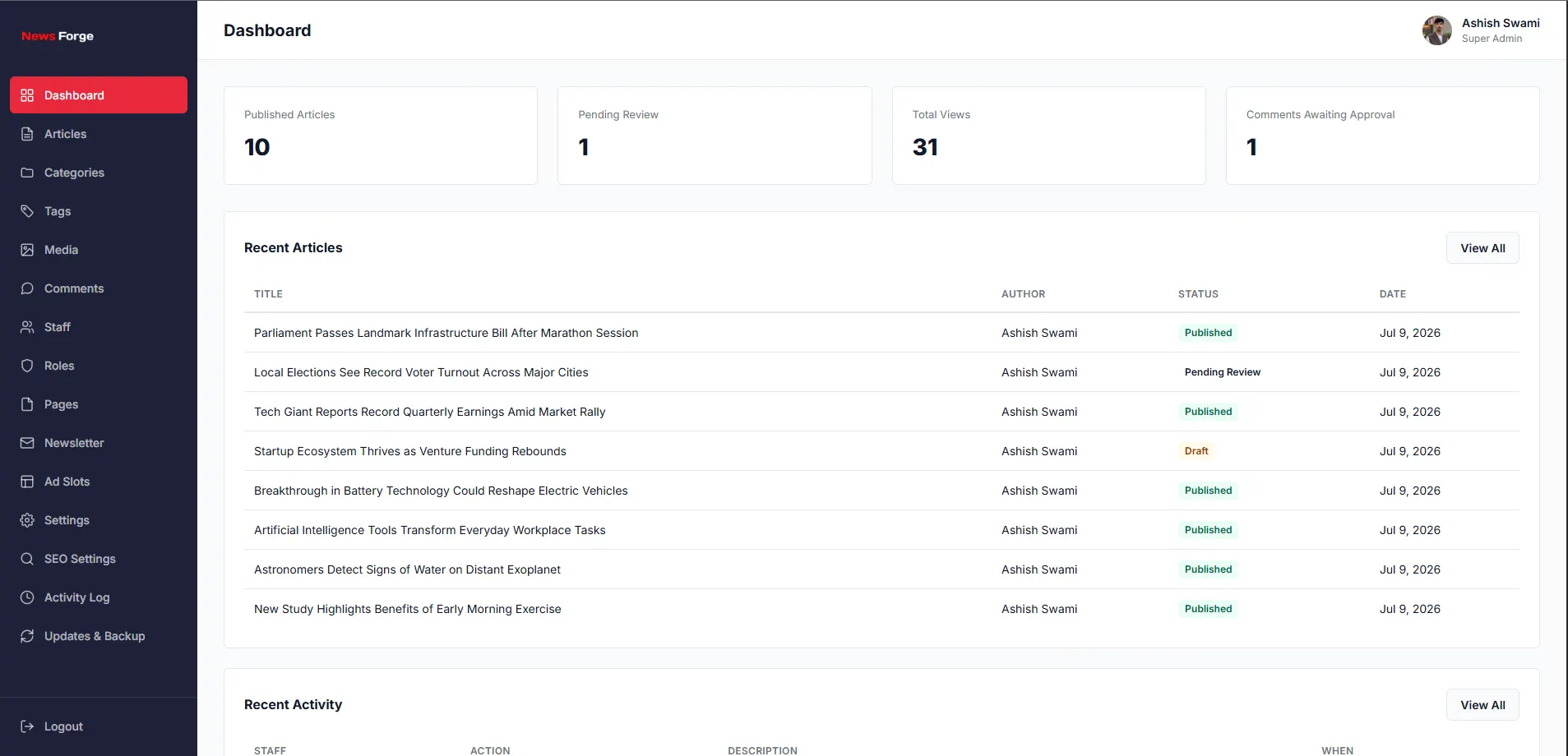
After purchasing your CMS and preparing your hosting environment, install the software on your server and connect it to your database.
With NewsForge, the installation requires the supported PHP environment, MySQL or MariaDB database, required PHP extensions, and a valid license key.
Once installed, you can configure important website settings such as your publication name, categories, branding, and other administrative options.
Step 5: Create Your News Categories
A well-organized category structure makes it easier for visitors to discover your content and helps search engines understand the structure of your website.
Depending on your publication, categories could include:
- Local News
- National News
- World News
- Technology
- Business
- Sports
- Entertainment
- Education
- Health
- Lifestyle
Don't create dozens of categories when you're starting out. Begin with the sections that match your actual publishing strategy and expand the structure as your content grows.
Step 6: Build an Editorial Workflow
If you're running a professional publication with multiple contributors, an editorial workflow can help prevent publishing mistakes and keep your newsroom organized.
A typical workflow looks like this:
- A reporter creates a draft.
- The article is submitted for review.
- An editor checks the content.
- The editor approves or rejects the article.
- The approved article is published immediately or scheduled for a later time.
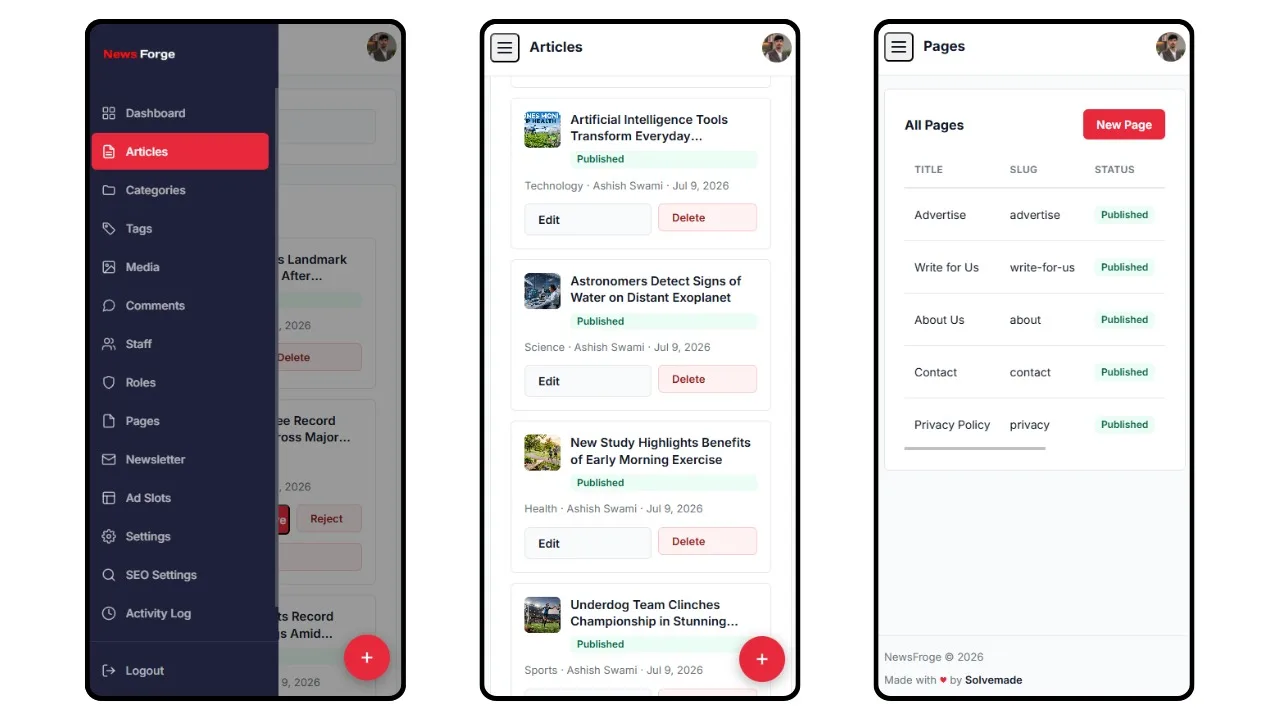
NewsForge includes four staff roles: Super Admin, Editor, Reporter, and Moderator. It also supports a draft-to-review-to-publish workflow and scheduled publishing.
This makes it possible to separate writing, editing, moderation, and administration instead of giving every team member complete access to the website.
Step 7: Create and Publish High-Quality Articles
Your website design may attract visitors, but useful and trustworthy content is what gives them a reason to return.
When writing a news article, focus on clear information and a consistent structure. A basic article can include:
- A clear headline
- A short introduction
- The key facts
- Supporting details
- Relevant images or media
- Sources or references when appropriate
- A concise conclusion or additional context
Avoid misleading headlines and unnecessary keyword repetition. Your headline should accurately represent what the article contains.
Step 8: Optimize Your News Website for SEO
Search engine optimization is especially important for publishers because a large portion of news website traffic can come from search engines.
Start with the basics:
- Write descriptive and useful page titles.
- Create unique meta descriptions.
- Use clean and readable URLs.
- Organize articles using relevant categories and tags.
- Use descriptive headings.
- Optimize images before uploading them.
- Make sure your website works well on mobile devices.
- Improve page loading performance.
- Use internal links between related articles.
- Create and maintain an XML sitemap.
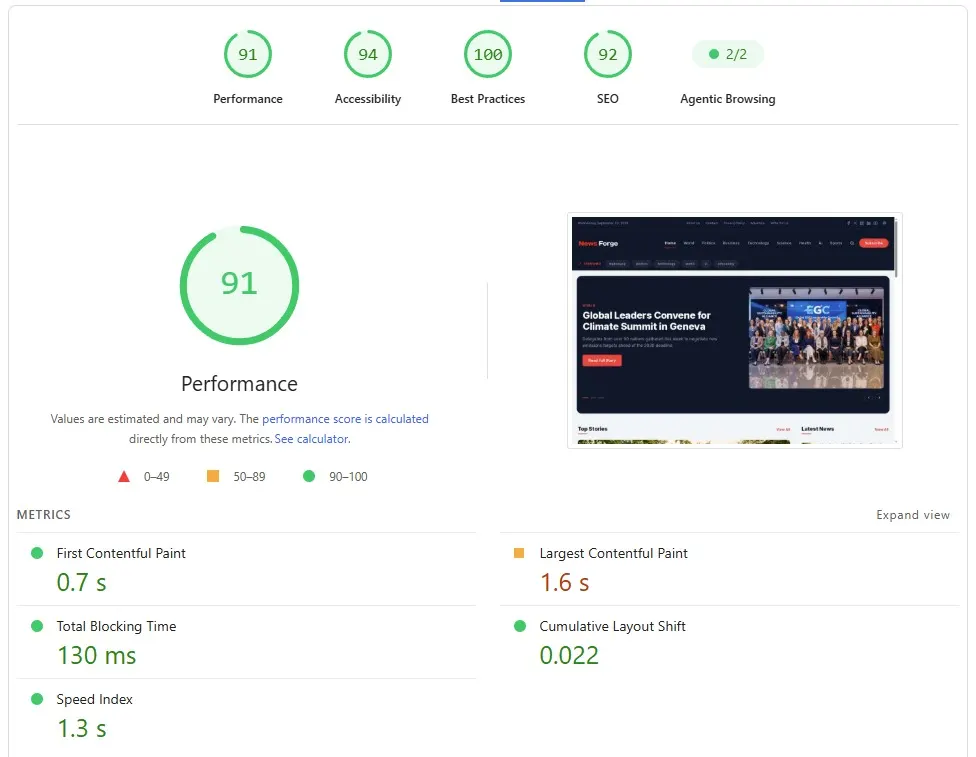
A news CMS with built-in SEO functionality can reduce the amount of manual configuration required for these tasks.
NewsForge SEO Features
NewsForge includes several built-in SEO features designed for publishing websites. These include meta tags, Open Graph data, Twitter Cards, JSON-LD structured data, and an automatically generated XML sitemap.
The platform also uses clean URLs throughout the website, including article, category, tag, search, and author pages.
These features provide a useful technical foundation for making a news publication easier for search engines and social platforms to understand.
Step 9: Make Your News Website Mobile-Friendly
A large number of visitors access news content from smartphones, so responsive design should be a priority from the beginning.
Your navigation should be easy to use on smaller screens, articles should remain readable without zooming, and important actions such as search and social sharing should be accessible.
NewsForge uses a mobile-first responsive frontend with a sticky header, expandable search, and dark and light display modes. Article pages also include features such as reading progress, social sharing, related articles, and a sticky sidebar.
Step 10: Add Images and Manage Your Media
Images can make news articles more engaging, but managing hundreds or thousands of images manually can quickly become difficult.
A dedicated media library makes it easier to upload, find, and reuse images across your publication.
NewsForge includes a WordPress-style media library with search, bulk selection, and drag-and-drop uploads. This allows your newsroom to manage images from a central location.
Step 11: Add Advertising to Your News Website
Once your website starts receiving consistent traffic, advertising can become one potential source of revenue.
You can work with direct advertisers, advertising networks, sponsored content programs, or other monetization methods depending on your audience and business model.
NewsForge includes five configurable advertising slots, allowing publishers to manage advertising placements from the administration area.
However, avoid placing too many advertisements above or between paragraphs. Excessive advertising can make articles difficult to read and may negatively affect the user experience.
Step 12: Build a Newsletter
Search and social traffic can change over time, so building a direct relationship with your audience can be valuable.
A newsletter gives readers a simple way to receive updates from your publication without having to visit your website every day.
NewsForge includes built-in newsletter subscription management, allowing publishers to collect and manage newsletter subscribers from the CMS.
Step 13: Add Comments and Moderation
Comments can help create a community around your publication, but they also require moderation.
If you enable comments, establish clear moderation rules and remove spam, abusive content, and irrelevant submissions.
NewsForge includes a comment system with a moderation queue, giving administrators a way to review comments before managing them on the website.
Step 14: Protect Your News Website
Security should be considered from the beginning, especially when multiple people have access to your administration panel.
Use strong passwords, limit unnecessary administrator access, keep your server software updated, and maintain regular backups.
NewsForge includes several security-focused features such as CSRF protection, prepared database statements, sanitized content, rate-limited login attempts, and a license-gated installer.
The platform also includes manual backup and restore functionality for website files and database data.
Step 15: Keep Your CMS Updated
Regular software updates are important for maintaining security, fixing bugs, and receiving improvements.
NewsForge includes an in-admin one-click update system that creates an automatic backup before an update. This provides an additional recovery option if something goes wrong during an update.
How Much Does It Cost to Create a News Website?
The cost depends on the technology, hosting, design, content team, and features you choose.
A basic news website may require expenses such as:
- Domain registration
- Web hosting
- News CMS or website software
- Logo and branding
- Content creation
- Marketing and promotion
- Optional development and customization
Using a ready-made news CMS can reduce development time compared with building a publishing platform completely from scratch.
NewsForge vs Building a News Website From Scratch
Building a custom news platform from scratch gives you complete control over the technology and functionality, but it also requires significantly more development work.
A ready-made CMS can provide many common publishing features from the beginning, allowing you to focus more on your publication and content.
With NewsForge, features such as staff roles, editorial workflow, media management, scheduled publishing, SEO tools, comments, newsletters, advertising slots, backups, and updates are already part of the platform.
This can be particularly useful for publishers who want to launch a news website without developing an entire CMS themselves.
Who Can Use NewsForge?
NewsForge can be used for different types of publishing websites, including:
- Local news portals
- City and regional news websites
- Online newspapers
- Technology news websites
- Business publications
- Sports news portals
- Entertainment magazines
- Niche online magazines
- Independent publishing websites
- Community news platforms
News Website Launch Checklist
Before launching your publication, make sure you have completed the following:
- Choose a memorable domain name.
- Set up reliable hosting.
- Install your news CMS.
- Configure your website branding.
- Create your main categories.
- Set up staff accounts and permissions.
- Configure your editorial workflow.
- Publish several high-quality articles.
- Optimize titles, descriptions, URLs, and images.
- Check your XML sitemap.
- Test the website on mobile and desktop devices.
- Configure backups and security.
- Set up social media profiles.
- Plan your newsletter strategy.
- Configure advertising placements if required.
Final Thoughts
Creating a news website in 2026 is much easier when you start with the right technology and a clear publishing strategy. The website needs to be fast, responsive, easy to manage, search-engine friendly, and capable of supporting your editorial workflow as your publication grows.
If you don't want to develop a complete news CMS from scratch, NewsForge provides a ready-made foundation for launching a self-hosted news or magazine website. It combines a responsive frontend with an administration dashboard, role-based publishing, media management, SEO tools, scheduled publishing, advertising management, newsletters, comments, backups, and update functionality.
Whether you're planning a local news portal, online magazine, niche publication, or independent media website, starting with a structured CMS can help you spend less time building the publishing infrastructure and more time creating useful content for your audience.
Ready to Create Your News Website?
Explore NewsForge and see how a dedicated self-hosted news CMS can help you launch and manage your publication.